BDG Game / Game articles / BDG Game Mines
BDG Game Mines
BDG Game has Mines in more than one place: Mines (with a JILI badge) and Mines Pro in Mini games, and Mines in the Original games. In each, you uncover tiles on a grid; safe tiles raise the multiplier and a bomb ends the round.
 By Priyanka Khatri · Updated 31 October 2026
New to BDG Game? Start with BDG Game login, register and app download, or see the full BDG Game list.
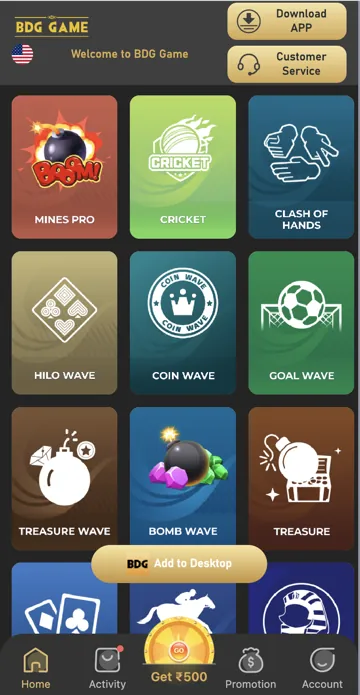
Where Mines is in BDG Game
In Mini games, Mines is in the third row and Mines Pro starts the next part of the list, next to Cricket and Clash of Hands. Original games also include Mines.
How BDG Game Mines works
Choose your bet and, where offered, how many bombs are hidden. Tap tiles one by one. Cash out after any safe tile. More bombs means a faster-growing multiplier and more risk per tap.
Which Mines to play
The versions are separate games with their own payout tables. Open the help screen in each before comparing.
Mines predictor apps
Bomb positions change every round. Apps that claim to show them are fake and often ask for your login. Avoid them.
How to play BDG Game Mines step by step
- Open Mines from Mini games or Original.
- Set your stake and number of bombs.
- Tap a tile. A star raises the multiplier; a bomb ends the round.
- Tap Cash Out to collect after any safe tile.
How many bombs to choose
Fewer bombs mean more safe tiles and a slow-growing multiplier. More bombs make the multiplier rise faster but each tap is riskier. There is no "best" number; choose the pace you are comfortable with.
Mines terms
- Bombs: hidden tiles that end the round.
- Gems or stars: safe tiles that raise the multiplier.
- Cash Out: collect your current winnings.
- Grid size: how many tiles are on the board.
Common Mines mistakes
- Clicking "one more tile" after deciding to stop.
- Picking the maximum bombs before learning the game.
- Believing a corner or pattern is safer.
How to check a disputed result
If a result or payout looks wrong, take a screenshot of the result and your bet record with the time visible. Note the round or period number. Then open Customer Service and send those details. Do not keep playing to "win it back" while you wait.
Smart limits for this game
- Pick a session budget before you open the game and never top up mid-session.
- Set a stop time; quick rounds make an hour disappear.
- Stop after a set number of losses in a row.
- Never borrow, or use rent or bill money.
- If it stops being fun, close the app for the day.
Common questions
Is Mines on BDG Game?
Yes: Mines and Mines Pro in Mini games, and Mines in Original.
Can Mines be predicted?
No. Bomb positions change every round.
More in BDG Game Mini games
Visit the BDG Game home page for login, registration, app options, and game categories.